Powered by


QOHDD Connect
Give your loved one access to ATLIS from the inside.
QOHDD Connect gives loved ones and advocates a way to provide someone inside with access to ATLIS — a pro-social AI companion for thoughtful conversation, reflection, learning, and continuity.
Through a public-facing phone number, your loved one can speak with ATLIS, explore ideas, organize thoughts, build confidence with AI, and prepare for life in a technology-driven world.
What You Are Signing Up For
When you sign up for QOHDD Connect, you create an account that gives your loved one access to a dedicated QOHDD Connect phone number.
That number connects the caller to ATLIS by phone. The caller does not need to manage an app, remember a login, or understand complicated technology. They simply call the assigned number and speak.
The account holder manages the subscription, prepaid minutes, access level, and account settings. The caller receives access to a constructive AI companion designed to support conversation, reflection, learning, and continuity.
Voice-first access
Your loved one can use an ordinary approved call path to speak with ATLIS. The experience is designed around conversation, not screens, forms, or complicated technology.
Built around ATLIS
ATLIS helps the caller talk through thoughts, ask questions, explore ideas, reflect on choices, and carry useful context forward into future conversations.
How It Works
A simple phone call becomes a space for reflection, learning, and continuity.
QOHDD Connect is designed to make access simple for the caller and useful for the family, advocate, or support person managing the account.
The account holder signs up
A family member, advocate, ministry, mentor, or support person creates the account, chooses the monthly access level, and purchases prepaid calling minutes.
The caller receives the number
The account holder shares the assigned QOHDD Connect phone number with the person who will speak with ATLIS, subject to facility calling rules.
The caller speaks with ATLIS
The caller uses a normal call to talk through thoughts, questions, goals, concerns, plans, learning interests, and next steps.
The conversation creates continuity
Conversations can be transcribed, summarized, organized, and carried forward so future support does not have to start from zero every time.
Why Access Matters
Technology should not leave people behind.
The world is changing quickly. QOHDD Connect helps people inside begin interacting with AI in a constructive, pro-social way.
Reflection
ATLIS gives the caller a place to think out loud, examine choices, name patterns, and talk through what matters.
Learning
The caller can ask questions, explore ideas, deepen understanding, and stay mentally engaged through conversation.
Digital confidence
Speaking with ATLIS gives someone inside experience interacting with AI and intelligent technology before returning home.
Reentry preparation
QOHDD Connect is built to support reflection, learning, communication, and preparation for life beyond incarceration.
Who It Is For
Built for people supporting someone through incarceration, distance, and limited access.
Families
For mothers, fathers, partners, siblings, and loved ones who want the person inside to have access to constructive conversation, reflection, and support.
Advocates
For advocates who need clearer continuity, better context, and a more structured way to understand what someone is working through over time.
Support Networks
For mentors, ministries, reentry supporters, and community members helping someone stay focused on growth and preparation.
Justice-Impacted Communities
For people affected by incarceration, reentry, distance, institutional barriers, and limited access to modern digital tools.
Why It Is Different
QOHDD Connect is not just another phone line.
A normal call ends when the call ends. Important thoughts, questions, plans, and moments of clarity can disappear.
QOHDD Connect is different because conversation becomes part of a continuing support space. ATLIS can help preserve context, organize themes, support reflection, and make each future conversation more useful than the last.
For someone inside, that means the conversation can become more than a moment. It can become a thread of growth, learning, and preparation.
- Every call starts from scratch
- Important details are easy to lose
- Questions and goals can get scattered
- Families may struggle to understand what is changing
- Conversations build on prior context
- Transcripts and summaries preserve key information
- Reflection, learning, and goals become easier to follow
- Support becomes more structured over time
The Intelligence Layer
ATLIS is the AI companion inside QOHDD Connect.
ATLIS is built for thoughtful conversation, reflection, learning, and continuity. It can help the caller talk through what is on their mind, ask questions, explore ideas, organize thoughts, and return to important themes over time.
ATLIS is not a lawyer, doctor, therapist, correctional official, or human advocate. It is a support tool designed to help conversations become more structured, more reflective, and easier to build on.
What Is Included
A practical support system built around access, minutes, ATLIS, and continuity.
Dedicated QOHDD Connect Number
Your account includes access to a dedicated phone number that connects the caller to the QOHDD Connect experience.
Access to ATLIS
The caller can speak with ATLIS by phone for reflective conversation, learning, planning, and continuity.
Monthly Access Level
Choose Connect for basic access or Unleashed for deeper visibility, transcript access, insights, and expanded continuity features.
Prepaid Calling Minutes
Calling minutes are purchased in advance. Calls draw down from the available prepaid minute balance.
Transcript-Backed Continuity
Depending on your access level, conversations may be transcribed, summarized, and organized so support can continue across time.
Unleashed Family Visibility
Unleashed helps families and advocates see the thread of growth through transcript access, conversation insights, and stronger continuity.
Account Holder Control
The account holder manages the subscription, prepaid minute balance, access level, and account details.
Public-Facing Access
QOHDD Connect is not a prison phone company and does not require prison integration. It provides a public-facing phone number callers may use when facility rules allow.
Designed for Real-World Constraints
QOHDD Connect is built for situations where communication matters but access to technology, support, and consistent guidance may be limited.
The Core Promise
You cannot always be there for every moment.
QOHDD Connect helps you give your loved one access to ATLIS — a pro-social AI companion built to support reflection, learning, conversation, and continuity from the inside.
It is a way to help carry part of the weight by giving someone inside a constructive space to think, be heard, explore ideas, and keep building.
Get Your Number NowQOHDD Connect Signup
See How QOHDD Connect Signup Works
Choose your monthly access level, purchase the required starter minute bundle, then manage prepaid calling minutes as needed.
Choose Your Access Level
Select the plan that matches the level of visibility and support you need.
Purchase the Starter Bundle
Every account begins with the required 1,000-minute prepaid starter bundle.
Use and Refill Minutes
Calls draw down from the available prepaid minute balance. Additional bundles can be added as needed.
Monthly Plan
Connect
Basic access to a dedicated QOHDD Connect phone number.
Full Access
Monthly Plan
Unleashed
Transcript access, insights, expanded visibility, and future platform developments.
Prepaid Minutes
Minutes are purchased in advance.
At signup, each account must purchase the initial 1,000-minute bundle for $135.
Initial 1,000-minute bundle
10% better value100 additional minutes
Baseline rate1,000 additional minutes
10% better value5,000 additional minutes
33.3% better value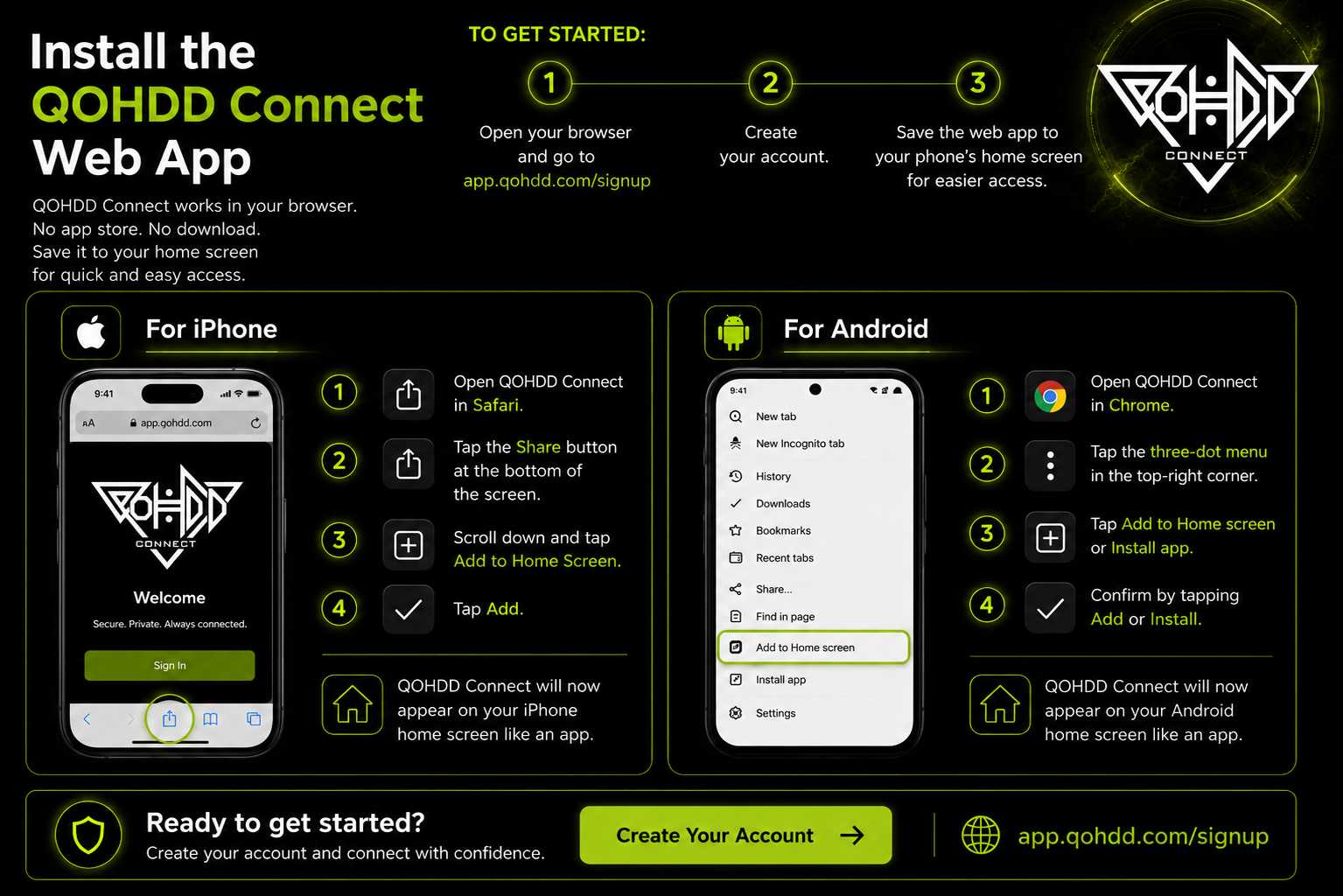
Web / Mobile Application
Install QOHDD Connect
QOHDD Connect works in your browser. Create your account, then save the web/mobile application to your phone’s home screen.
Open your browser and go to app.qohdd.com/signup.
Create your account.
Save QOHDD Connect to your phone’s home screen for quick access.
For iPhone
- Open QOHDD Connect in Safari.
- Tap the Share button.
- Tap Add to Home Screen.
- Tap Add.
For Android
- Open QOHDD Connect in Chrome.
- Tap the three-dot menu.
- Tap Add to Home screen or Install app.
- Confirm by tapping Add or Install.